RFC using CURP
In Tu identidad we will have, as part of our service proposal, a new form of integration with an asynchronous processing flow.
This is an integration mechanism where the verification response is not delivered in the same request but in a subsequent message immediately after it is made available. So it is understood that for every verification request there will be a processing response even when the verification process fails.
In this process it is necessary to have a client-side webhook that receives notifications when the asynchronous process ends. Link to webhook: https://docs.tuidentidad.com/async-verification-service/#verification-result-webhook
This new integration flow will allow Tu identidad to have a better management of latency and intermittency caused by official sources of information, which will lead to greater scaling and performance of the service.
As part of the integration process, a service configuration step will be necessary, where Tu identidad will record the URL and connection data with security for the delivery of the verification result.
The services to have this mechanism will be:
- The verification of the registration of the official identification before the nominal list of the INE.
- The verification of the RFC by CURP.
Verification retries policies
The services incorporates a retry policy that allows the request to be sent again when the source site is under maintenance or a processing error has occurred, two verification retries will be performed; the first retry will be 20 minutes after the request is processed and the second, if necessary, will be 40 minutes later.
Delivering retries policy
The service executes 3 attempts to deliver the message on the client's webhook, if the webhook does not receive the message the status will remain as 3 = delivering, because it was never received.
Web service description
Verification request for RFC by CURP
This method performs the creation of exchange of a CURP for the RFC and get the id to track it.
~/api/AsyncVerification/RfcByCurp
Request Parameters
| Tag | Type | Required | Description |
|---|---|---|---|
| curp | string | yes | Clave Única de Registro de Población. |
| state | int | yes | Id for the registration state of the RFC |
State Catalog
| Id | State |
|---|---|
| 1 | Aguascalientes |
| 2 | Baja California |
| 3 | Baja California Sur |
| 4 | Campeche |
| 5 | Coahuila |
| 6 | Colima |
| 7 | Chiapas |
| 8 | Chihuahua |
| 9 | Ciudad de México |
| 10 | Durango |
| 11 | Guanajuato |
| 12 | Guerrero |
| 13 | Hidalgo |
| 14 | Jalisco |
| 15 | Estado de México |
| 16 | Michoacán |
| 17 | Morelos |
| 18 | Nayarit |
| 19 | Nuevo León |
| 20 | Oaxaca |
| 21 | Puebla |
| 22 | Querétaro |
| 23 | Quintana Roo |
| 24 | San Luis Potosí |
| 25 | Sinaloa |
| 26 | Sonora |
| 27 | Tabasco |
| 28 | Tamaulipas |
| 29 | Tlaxcala |
| 30 | Veracruz |
| 31 | Yucatán |
| 32 | Zacatecas |
Headers
| Tag | Type | Required | Description |
|---|---|---|---|
| ApiKey | string | yes | Customer key. |
| Content-Type | string | No | application/json. |
FormBody
{
  "curp": "string",
  "state": "int"
}
Example
{
  "curp": "XAXA010101XXXXXX01",
  "state": 01
}
Response:
The services responds an ID to track the verification.
Success
| Name | Type | Description |
|---|---|---|
| verificationId | string | Id of the transaction. |
Error structure
| Name | Type | Description |
|---|---|---|
| code | string | Error code. |
| message | string | Error message. |
| statuscode | int | HTTP status code |
JSON
{
  "verificationId": "uuid" // Id of the transaction
}
Error model
{
  "code": "string", // Error code
  "message": "string", // Error message
  "statuscode": 400
}
Get verification request status
This method allows to get the status of verification of the requested data.
~/api/AsyncVerification/verificationStatus
Request Parameters
Query
| Tag | Type | Required | Description |
|---|---|---|---|
| verificationId | string | Yes | Id of the verification to track. |
Headers
| Tag | Type | Required | Description |
|---|---|---|---|
| apikey | string | Yes | Customer key. |
| Content-Type | string | No | application/json. |
Response:
The service responds with the status, general data of the verification and some details from it.
Success
| Name | Type | Description |
|---|---|---|
| verificationId | string | Id of the transaction. |
| verificationType | int | Type of verification. 2.- RfcByCurp |
| verificationStatus | int | Status of verification. 1.- Processing, 2.- Retrying, 3.- Delivering, 4.- Completed. |
| verification | string | Verification Data for each type in JSON format encoded as a string. |
| warnings | ||
| code | string | Error code. |
| message | string | Error message. |
Ine Nominal List Data
| Name | Type | Description |
|---|---|---|
| valid | true | If the document is valid or not as official identification. |
| canVote | true | If the document can be used to vote or not. |
| verification data | ||
| type | string | Document type. |
| electorCode | string | Elector code. |
| cicNumber | string | CIC number. |
| issueNumber | string | Issue number. |
| issueYear | string | Issue year. |
| registrationYear | string | Registration year. |
| ocrNumber | string | OCR. |
| expDate | string | Effective date. |
RFC by CURP Data
| Name | Type | Description |
|---|---|---|
| rfc | string | RFC related with the given CURP. |
NSS by CURP Data
| Name | Type | Description |
|---|---|---|
| nss | string | NSS related with the given CURP. |
Error structure
| Name | Type | Description |
|---|---|---|
| code | string | Error code. |
| message | string | Error message. |
| statuscode | int | HTTP status code |
JSON
Type RFC by CURP
{
  "verificationId": "",
  "verificationType": 2, // Type of verification. 1.- IneNominalList, 2.- RfcByCurp
  "verificationStatus": 3, // Status of verification. 1.- Processing, 2.- Retrying, 3.- Delivering, 4.- Completed.
  "verification": "{
    \"rfc\": \"string\"
  }",
  "warnings": [ // List of warning messages
    {
      "code": "string",
      "message": "string"
    }
  ]
}
Type Bank account (STP)
This method not allowed to return the information of this type, to get the information see the documentation at https://docs.tuidentidad.com/bank-account-validation/#get-validation-status
Error model
{
  "code": "string", // Error code
  "message": "string", // Error message
  "statuscode": 400
}
Verification result - Webhook
It is necessary to have a webhook developed and installed by the client.
The client must share to Tu Identidad the webhook URL and its authentication method so that Tu Identidad can communicate with the webhook.
The process is shown in the following image.
The POST API is executed, will generate a verification ID that allows the result to be verified later, at the same time it will execute the corresponding process to obtain the desired information, later once the information is obtained, it will be sent to the client's webhook and Tu Identidad will remain waiting for confirmation that the client did receive said information, once the client notifies with a status of 200, for more information access to this link Response webhook.
The service of Tu Identidad will change the verificationStatus to 4 and the information can be consulted from the GET API.
When the verification process ends a message is sent with the result of the verification and the credentials to the webhook URL specified in the integration configuration of the service.
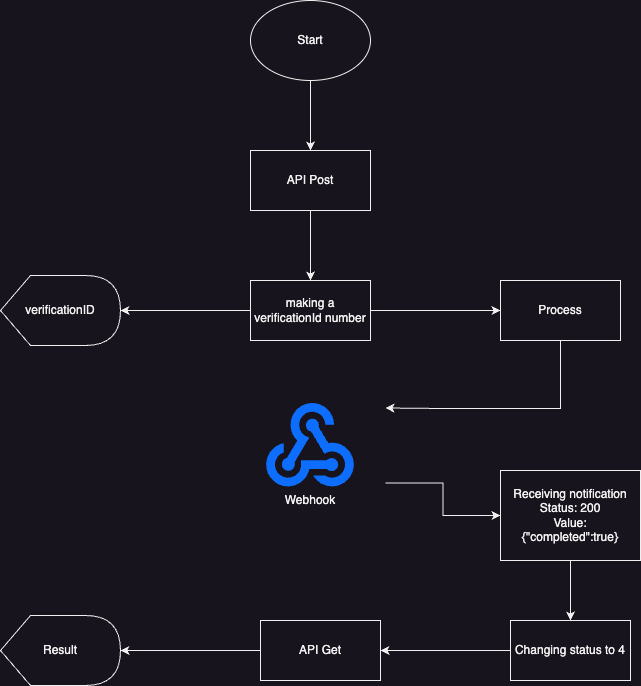
Delivery retries policies
The service incorporates a retry policy that allows the information related to the requested verification to be sent again, a maximum of 5 communication attempts will be made; the first retry will be 15 minutes after the verification and will be consistent until a favorable response is obtained or 5 attempts are reached.
~/
Request Parameters
| Name | Type | Description |
|---|---|---|
| verificationId | string | Id of the transaction. |
| verificationType | int | Type of verification. 1.- IneNominalList, 2.- RfcByCurp, 3.- NssByCurp. 4.- Bank account (STP) |
| verificationStatus | int | Status of verification. 1.- Processing, 2.- Retrying, 3.- Delivering, 4.- Completed. |
| verification | string | Ine Nominal List Verification Data in JSON format encoded as a string. |
| warnings | ||
| code | string | Error code. |
| message | string | Error message. |
Ine Nominal List Data
| Name | Type | Description |
|---|---|---|
| valid | true | If the document is valid or not as official identification. |
| canVote | true | If the document can be used to vote or not. |
| verification data | ||
| type | string | Document type. |
| electorCode | string | Elector code. |
| cicNumber | string | CIC number. |
| issueNumber | string | Issue number. |
| issueYear | string | Issue year. |
| registrationYear | string | Registration year. |
| ocrNumber | string | OCR. |
| expDate | string | Effective date. |
RFC by CURP Data
| Name | Type | Description |
|---|---|---|
| rfc | string | RFC related with the given CURP. |
NSS by CURP Data
| Name | Type | Description |
|---|---|---|
| nss | string | NSS related with the given CURP. |
Bank account (STP)
| Name | Type | Description |
|---|---|---|
| VerificationId | string | Transaction ID. |
| verificationStatus | int | Status of verification. 1.- Processing, 2.- Retrying, 3.- Delivering, 4.- Completed. |
| verification | ||
| Valid | bool | Indicates whether an account is valid or not. |
| data | ||
| ProvidedName | string | Owner's name entered. |
| ConfirmedName | string | Owner's name validated. |
| CLABE | string | CLABE to validate. |
| FI | number | The account’s bank. See list below. |
| Warnings | List |
List of errors. |
Headers
| Tag | Type | Required | Description |
|---|---|---|---|
| authorization | string | No | Authorization method |
| Content-Type | string | No | application/json. |
Authorization methods
As part of this solution Tu Identidad implement two authorization methods to make requests secure. These methods are the follow:
Authorization basic For this authorization method we need our customer provide us an user and password. We take this parameters, encode this as base64 string and send it in each request as a header.
| Tag | Type | Required | Example |
|---|---|---|---|
| authorization | string | No | Basic |
Example: User: user Password: password String: user:password String encoded: dXNlcjpwYXNzd29yZA== Header: authorization Header value: Basic dXNlcjpwYXNzd29yZA==
Authorization token For this authorization method we need our customer provide us a token. We take this parameter and send it in each request as a header.
| Tag | Type | Required | Example |
|---|---|---|---|
| authorization | string | No | Bearer |
Example: Token: 123456 Header: authorization Header value: Bearer 123456
FormBody
RFC by CURP
{
  "verificationId": "",
  "verificationType": 2, // Type of verification. 2.- RfcByCurp
  "verificationStatus": 3, // Status of verification. 1.- Processing, 2.- Retrying, 3.- Delivering, 4.- Completed.
  "verification": "{
    \"rfc\": \"string\"
  }",
  "warnings": [ // List of warning messages
    {
      "code": "string",
      "message": "string"
    }
  ]
}
Response:
The service must response with status code 200 and confirm that the data was receipt.
Success
| Name | Type | Description |
|---|---|---|
| completed | bool | Confirmation that the data was receipt. |
Error structure
| Name | Type | Description |
|---|---|---|
| code | string | Error code. |
| message | string | Error message. |
JSON
{
  "completed": true
}
Error model
{
  "code": "string", // Error code
  "message": "string", // Error message
  "statuscode": 400
}
Service messages
| Code | Message | Description | Http code |
|---|---|---|---|
| RFC002 | Access Denied. ApiKey header not found. | Message to be displayed when the apikey is not displayed. | 401 |
| RFC003 | The apiKey is not valid. | Message to be displayed when the user enters an incorrect apikey. | 401 |
| RFC004 | Something was wrong, we are working on the failure | Message displayed when there is an error on the service. | 500 |
| RFC005 | CURP does not match with source | Message displayed when the input CURP does not have information related. | 400 |
| RFC006 | The structure of the CURP is not correct | Message displayed when the input CURP does not match with the format. | 400 |
| RFC007 | The structure of the state is not correct | Message displayed when the input state in not into the catalog. | 400 |
| RFC008 | The information associated to the RFC was not found. | Message displayed when the information of the CURP could not be found. | 404 |
| RFC010 | SAT source unavailable. | Message displayed when the SAT servers cannot be consulted. | 503 |
HTTP Status Codes
The API uses standard HTTP status codes to indicate the success or failure of a request.
| Code | Status | Description |
|---|---|---|
| 200 | OK | Success or Success with Warnings (e.g., expired document). |
| 202 | Accepted | Verification is being processed (Async flow). |
| 203 | Non-Authoritative Information | Partial information was returned (e.g., bill file not available). |
| 204 | No Content | No information was found based on the provided data. |
| 400 | Bad Request | The request was invalid or lacked required parameters. |
| 413 | Payload Too Large | The file exceeds the maximum allowed weight or dimensions. |
| 415 | Unsupported Media Type | The file format is not supported. |
| 422 | Unprocessable Entity | The document could not be read or processed correctly. |
| 500 | Internal Server Error | An unexpected error occurred on the server. |
| 503 | Service Unavailable | External source or internal component is temporarily unavailable. |
| 504 | Gateway Timeout | The request to an external source timed out. |
Error Response Format
| Field | Type | Description |
|---|---|---|
| code | string | Error code identifier |
| message | string | Message |
| fullMessage | string | Complete message of the error code |
JSON Structure When the RFC is Valid
{
  "valid": boolean,
  "data": {
    "personType": "string",
    "rfc": "string",
    "businessName": "string",
    "name": "string",
    "registerStatus": "string",
    "emailContact": "string",
    "effectiveDate": "string"
  },
  "warnings": [
    {
      "code": "string",
      "message": "string",
      "fullMessage": "string"
    }
  ]
}

## JSON Response When the RFC is Invalid
```json
{
  "code": "string",
  "message": "string",
  "fullMessage": "string"
}
Error Codes / Warning Codes
| Code | Message | Description | HTTP Code |
|---|---|---|---|
| RFCS001 | Failed to retrieve data. | The service was unable to retrieve the requested data. | 500 |
| RFCS004 | The $0$ field is required. | The request contains required fields that are empty or contain only spaces. | 400 |
| RFCS007 | Inconsistent data detected. | The OCR process detected inconsistent or incorrect information. | 400 |
| RFCS010 | Invalid API key. | The provided API key is invalid. | 401 |
| RFCS011 | Request timed out. | The server took too long to respond and the request timed out. | 500 |
| RFCS012 | Failed to retrieve server response. | An error occurred while retrieving the response from the server. | 500 |
| RFCS013 | RFC or BusinessName does not match source. | The provided RFC does not match SAT registered company information. | 400 |
| RFCS014 | No certificates found for the RFC. | The RFC does not have certificates available for validation. | 203 |
| RFCS015 | Invalid RFC format. | The provided RFC does not have a valid format. | 400 |
| RFCS016 | SAT service unavailable. | The SAT service is temporarily unavailable. | 503 |
| RFCS017 | No matches found in SAT. | The RFC was not found in the SAT database. | 203 |
| RFCS019 | RFC information not found. | No information associated with the RFC could be retrieved. | 203 |
| RFCS020 | Fiscal regime cannot be verified. | fiscalRegime and fiscalRegimeDate could not be verified against SAT. | 400 |
| RFCS021 | RFC values do not match in OCR results. | Extracted RFC values (RFC, RFCBarcode, RFCDic) do not match. | 400 |
Support
If you encounter issues integrating the API, contact the Tu Identidad support team.